CSP is the Cubesat Space Protocol. It is a network protocol that was developed by Aalborg university, and is commonly used in cubesats, in particular those using GOMspace hardware. Initially the protocol allowed different nodes on a satellite to exchange packets over a CAN bus, but eventually it grew into a protocol that spans a network composed by nodes in the satellite and the groundstation that communicate over different physical layers, including RF links.
Recently I have been working on a project that involves CSP. To measure network performance and debug network issues, I have written some tooling in Rust, as well as a Wireshark dissector in Lua. The Rust tooling is an implementation from scratch and doesn’t use libcsp. Now I have open sourced these tools in a csp-tools repository and csp-tools Rust crate. In this post I showcase how the tools work.
The tools included in this repository are the following CLI tools.
cspdump. A tool similar totcpdump. It receives CSP packets from a ZMQ socket or a CAN interface and writes them to a PCAP file.csp-iperf. A tool similar toiperf. It sends CSP packets through a ZMQ socket or a CAN interface, expects these packets to be replied by a ping service, and measures throughput, round-trip-times and lost packets.csp-ping-server. A tool that implements a ping service. It can be used in combination withcsp-iperfto perform network performance measurements.
These tools all support the following physical layers or interfaces to send and receive CSP packets:
- CAN interface through SocketCAN in Linux. This uses CFP (CSP Fragmentation Protocol) as defined in CSP to fragment CSP packets over CAN. A 29-bit CAN extended identifier is constructed from several header fields, including the source and destination address, so that CAN bus arbitration implements priorities based on CSP addresses.
- ZMQ PUB and SUB socket. ZMQ is the usual way in which CSP applications are connected through a virtual network in Linux machines. An application such as the libcsp zmqproxy acts as a message broker. It receives CSP packets from applications on a PUB socket, and sends them to applications on a SUB socket. When sent over ZMQ, CSP packets are prepended with the CSP via address, which is the address of the next hop. In this way, applications can subscribe to the via addresses that they need to handle.
csp-iperf for CSP over ZMQ
As a first showcase of all of these tools, let’s use csp-iperf together with the csp_server_client example from libcsp. After building libcsp v1.0 as indicated in the repository and installing csp-tools with cargo install csp-tools, we first start zmqproxy by running
./zmqproxy
in the libcsp build/ directory. We also run the following in the build/ directory to launch the server example using ZMQ and CSP address 10.
./csp_server_client -a 10 -z localhost
We start cspdump by running
cspdump --pcap-file /tmp/csp.pcap
Now we can initiate csp-iperf as follows:
csp-iperf --src-addr 11 --dest-addr 10 \
    --packet-size 200 --tx-rate 20e3
This tells csp-iperf to use a source CSP address of 11, a destination CSP address of 10, a packet size of 200 bytes, and to throttle its transmission to 20 kbps. csp-iperf has a colour output that is easy to read at a glance.
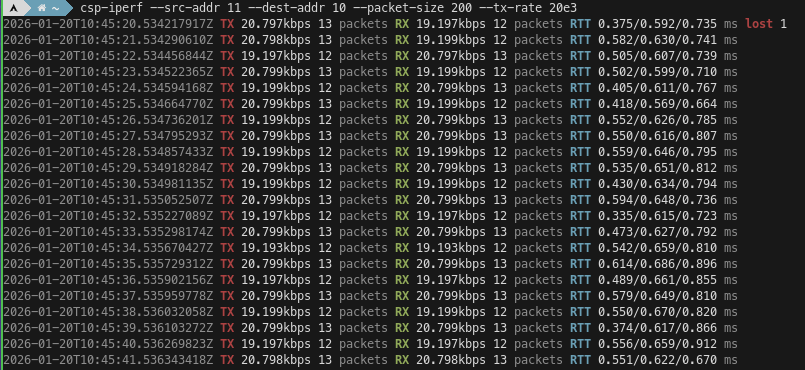
We can see how the requested 20 kbps data rate is achieved by sending 12-13 packets per second, that all the packets sent are received back except one at the beginning, and we also get a measurement of the minimum, average and maximum round-trip-times.
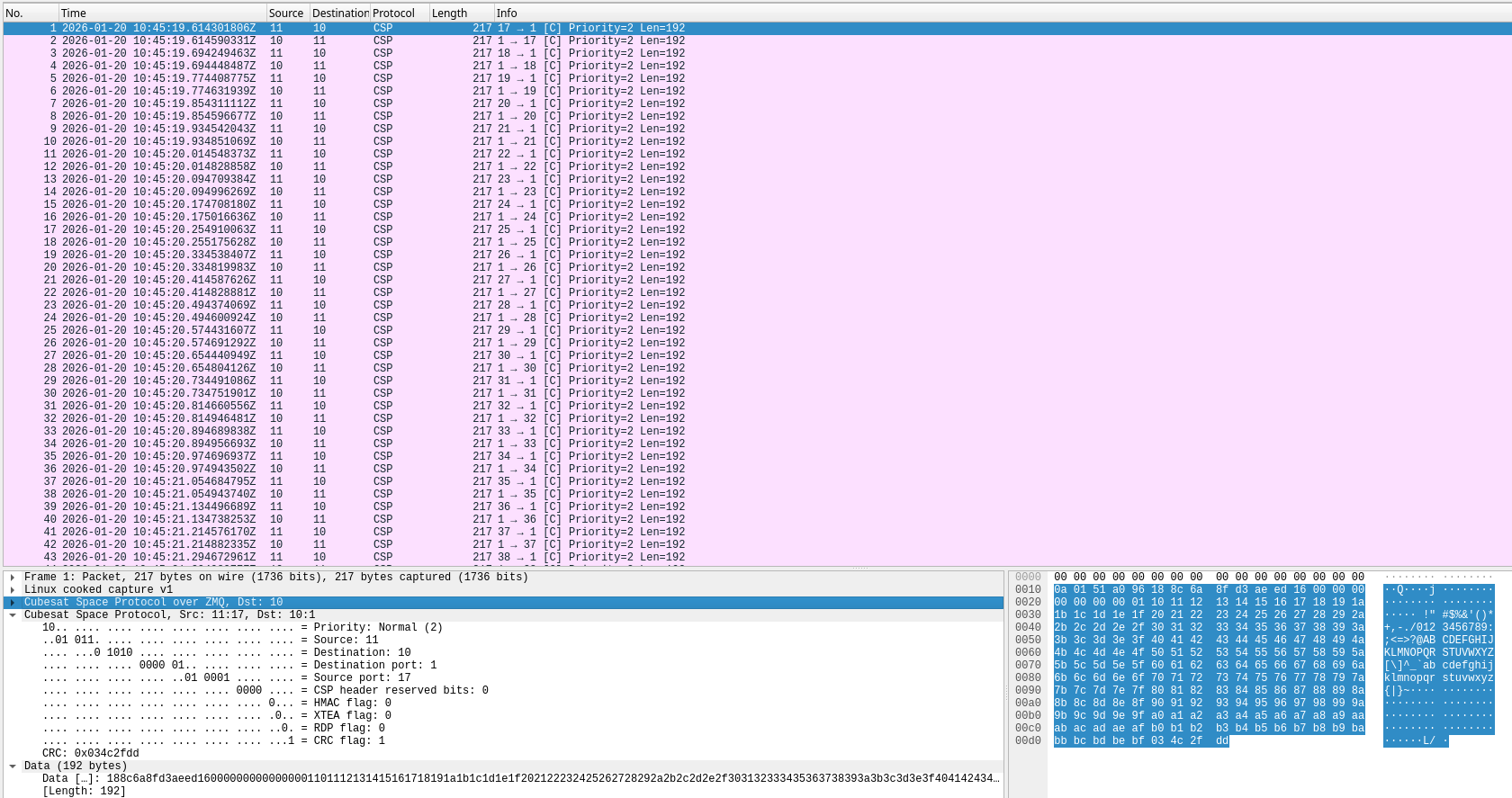
In Wireshark we can see that by default csp-iperf sends CSP packets with CRC to the ping service CSP port 1. The csp_server_client example bounces these packets back to csp-iperf. The source port number used to send the ping packets is chosen from the range 16-63, and it increments with each packet. All this can be customized with command line arguments. We can also see that the payload of the ping packets contains a timestamp (used for RTT measurement), a sequence number (used to count lost packets), and dummy data.
If we try to increment the data rate, say to 100 kbps, we see that there are many lost packets. The RX rate is only around 32 kbps.
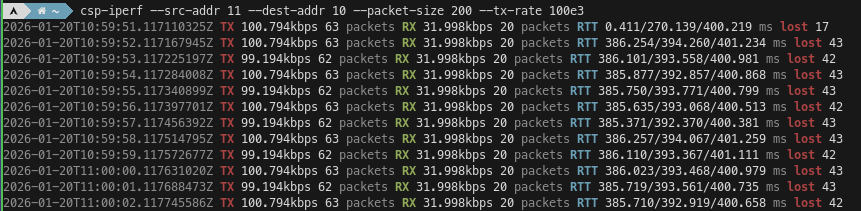
In the csp_server_client example we can see the following. This is because this application, unlike other CSP implementations, creates a CSP connection object for each ping packet received on a different port, and it quickly runs out of free connections.
1768906802.263721 SERVICE: Ping received
1768906802.293222 No free connections, max 10
1768906802.293227 No more connections available
1768906802.309237 No free connections, max 10
1768906802.309242 No more connections available
1768906802.313820 SERVICE: Ping received
1768906802.341239 No free connections, max 10
1768906802.341244 No more connections available
1768906802.357223 No free connections, max 10
1768906802.357228 No more connections available
To work around this, we can tell csp-iperf to use a fixed source port, such as 32. With these settings I can reach a rate of a few Mbps on my machine, but packets are occasionally lost.
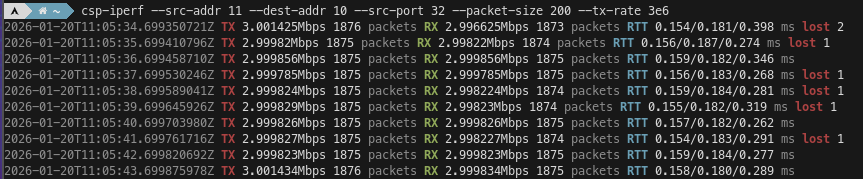
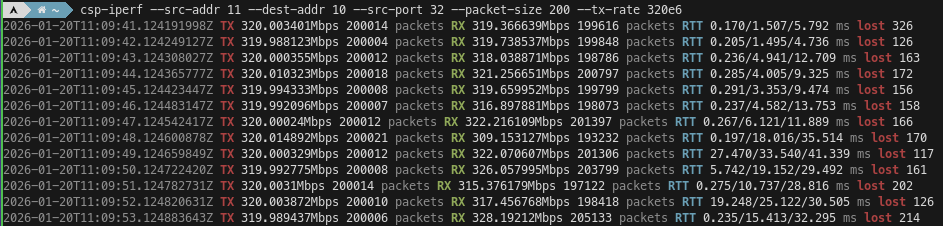
The data rate that this kind of test can support on my machine goes as high as 320 Mbps, but in these conditions we will have more frequent packet loss, and a rather high RTT of a few tens of ms.
As a replacement for the csp_server_client example, there is the tool csp-ping-server, which is more performant and more flexible. It is run as follows.
csp-ping-server --addr 10
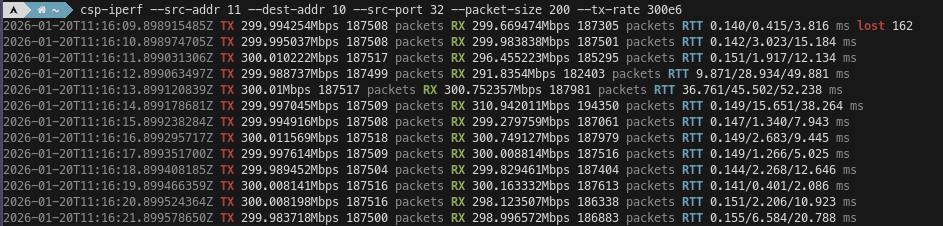
By using the csp-ping-server, I can usually sustain 300 Mbps rate on my machine without any packet loss, although this depends heavily on how well the CPUs are used.
Asymmetric throughput tests
A useful feature of csp-ping-server is the ability to use a reply packet size which is different from the request packet size. This can be used to perform a throughput test with asymmetric rates, which can be useful in situations such as the following:
- When testing an RF connection between the satellite and ground where uplink and downlink have different rates.
- When the requests and replies go through the same CAN bus and the CAN bus is the bottleneck. Since CAN is half-duplex, the requests and replies share the same bus throughput, and using symmetric rates can oversubscribe the CAN bus.
The reply packet size is implemented by truncating the request packet payload or extending it with padding when needed. In order to preserve timestamps and sequence numbers used for RTT and lost packets measurement, the reply packet size needs to be at least 24 bytes, or 20 bytes if CRC is disabled in the sender. If only timestamps are needed, the reply size can be 16 bytes, or 12 bytes with no CRC. If neither timestamps nor sequence numbers are needed, the reply size can be made as small as 4 bytes with no CRC, in which case the csp-ping-server replies packets that only consists of the 32-bit CSP header.
As an example of this feature, we can run the following to reply with 20-byte packets:
csp-ping-server --addr 10 --reply-size 20
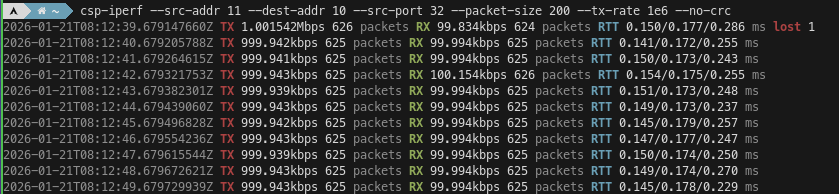
With a request packet size of 200 bytes in csp-iperf, this generates a 10:1 TX/RX ratio. Here we can see this working with 1 Mbps TX and 100 kbps RX.
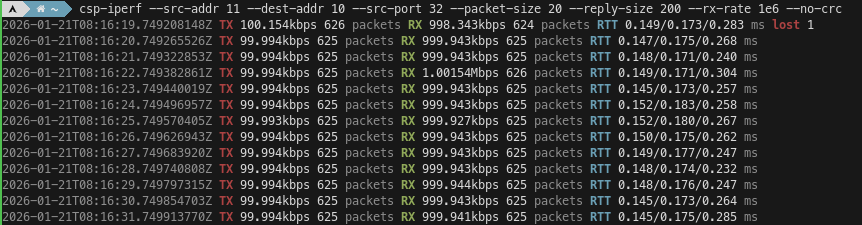
If we want to test the RX rate with a low TX rate, we can tell csp-ping-server to use a reply size of 200 bytes and tell csp-iperf to use a packet size of 20 bytes. For this kind of test, csp-iperf provides some convenience arguments to adjust the TX rate according to the desired RX rate. We can tell csp-iperf to expect a reply size of 200 bytes and to adjust the TX rate for an RX rate of 1 Mbps, and it will figure out that the TX rate needs to be 100 kbps.
CSP over CAN
So far all of these examples have used CSP over ZMQ, but it is also possible to use these tools with CAN. To show this, I will use a virtual CAN interface in Linux. This vcan interface can be set up as follows.
sudo modprobe vcan
sudo ip link add dev vcan0 type vcan
sudo ip link set vcan0 mtu 16
sudo ip link set up vcan0
Unlike real CAN interfaces, vcan interfaces do not have a bitrate, so their throughput is limited by how fast the software can run. CSP over CAN generally uses CAN 2.0, which has a maximum bitrate of 1 Mbps. Because CAN 2.0 has a maximum payload size of 8 bytes, CAN has a massive overhead. A frame carrying 8 bytes of data actually needs 131 bits, and on top of that there can be bit stuffing depending on the frame contents. This calculator shows that the throughput of 1 Mbps CAN can range between 415.58 kbps and 488.55 kbps depending on bit stuffing. The CSP throughput is slightly lower than this because CFP also needs to send a 16-bit length field in the data of the first CAN frame of each CSP packet.
We can run csp-ping-server with a CAN interface like so.
csp-ping-server --addr 10 --can vcan0
Here we show a 200 kbps csp-iperf test over the vcan interface. This is close to the maximum symmetric data rate that we can get on a 1 Mbps CAN interface.
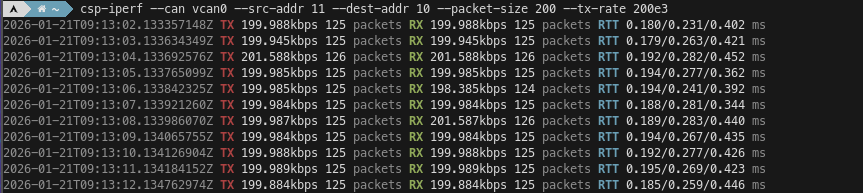
We can use canbusload from can-utils to monitor the CAN interface utilization.
canbusload vcan0@1000000
[...]
vcan0@1M  6500 1025000  404000       0 102%
[...]
By default canbusload assumes worst-case bit stuffing when computing the bus utilization, so it is possible to see a utilization above 100% even in real CAN interfaces. We can use the -e option in canbusload to use an exact bit stuffing calculation. This gives the actual bus load caused by these packets.
canbusload -e vcan0@1000000
[...]
vcan0@1M 6500 865221 404000 0 86%
[...]
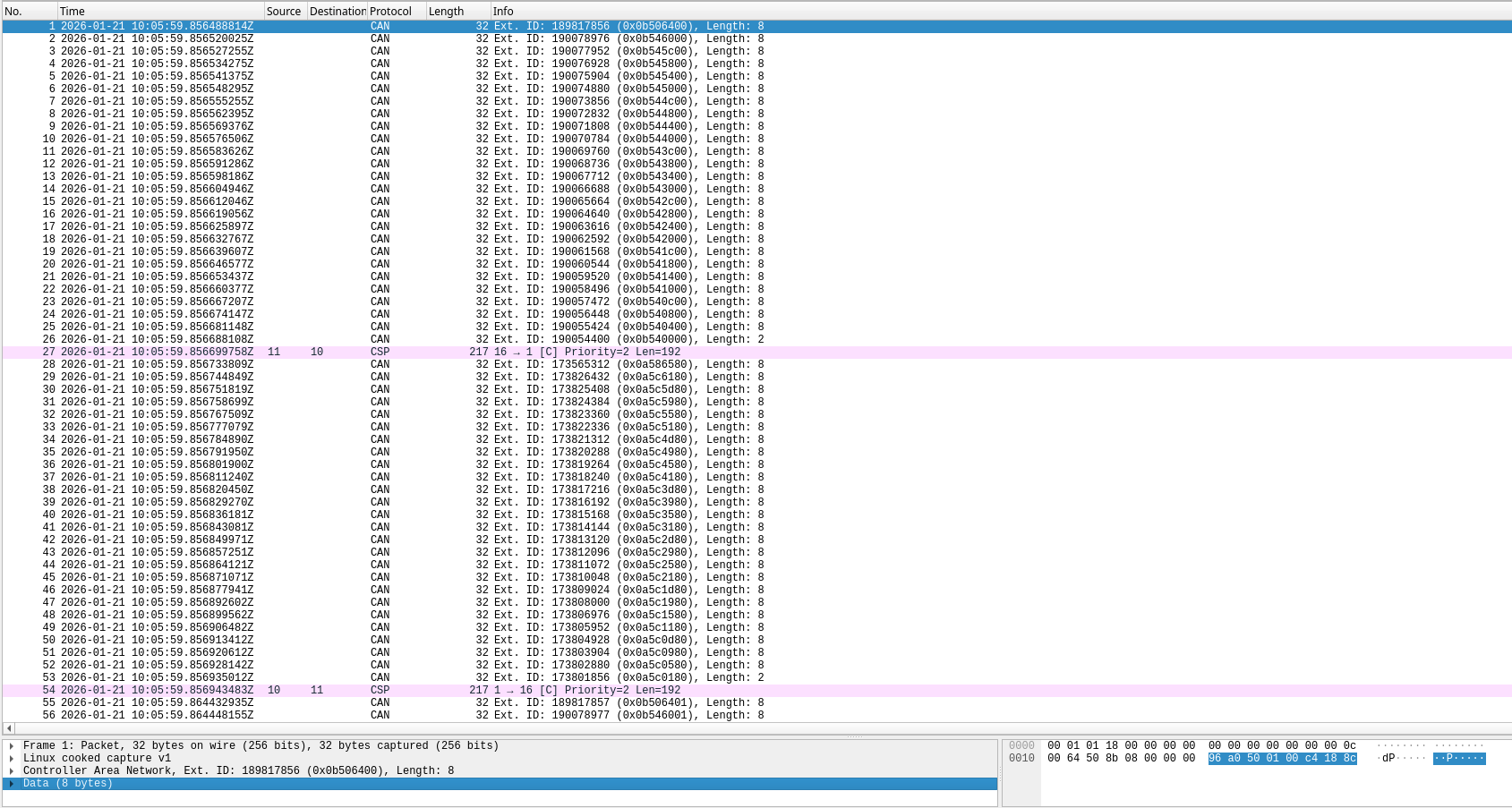
For low-level debugging of CAN networks, cspdump has an option that writes both CAN frames and the defragmented CSP packets to the same PCAP file. We can use this as follows.
cspdump --can vcan0 --include-can-frames \
    --pcap-file /tmp/csp.pcap
In Wireshark we can see the CAN frames that contain CFP fragments, and the defragmented CSP packet afterwards. It is possible to read some fields directly from the CAN ID in hex. For instance, the first byte (0x0b) is the source CSP address. The second to last byte counts down the number of remaining fragments (0x64, 0x60, 0x5c, …, 0x04, 0x00), but it counts in units of 4 because the next field is 10 bits long.
Wireshark dissector for RDP packets
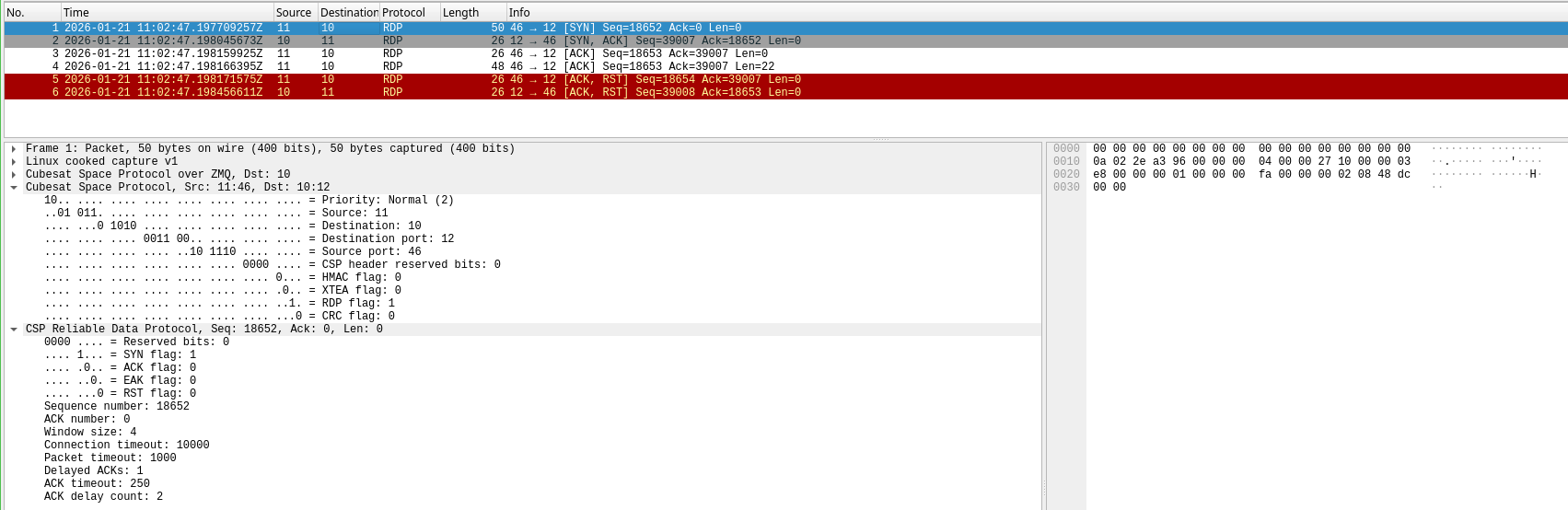
RDP is the Reliable Datagram Protocol defined in RFC 908. CSP uses a variant of this protocol to transmit data reliably in a sequence-controlled way. The Wireshark dissector can parse CSP RDP packets. Here I show an example produced by two test applications that use libcsp to send and receive a short message using RDP.
The RDP connection starts with a SYN packet that establishes the connection options and the initiators’s initial sequence number. This packet is shown here.
The responder sends a SYN,ACK packet that establishes the connection and sets its initial sequence number. The initiator sends an empty ACK, and then it sends a data packet, which is shown here. Note that the RDP header is actually placed after the data.
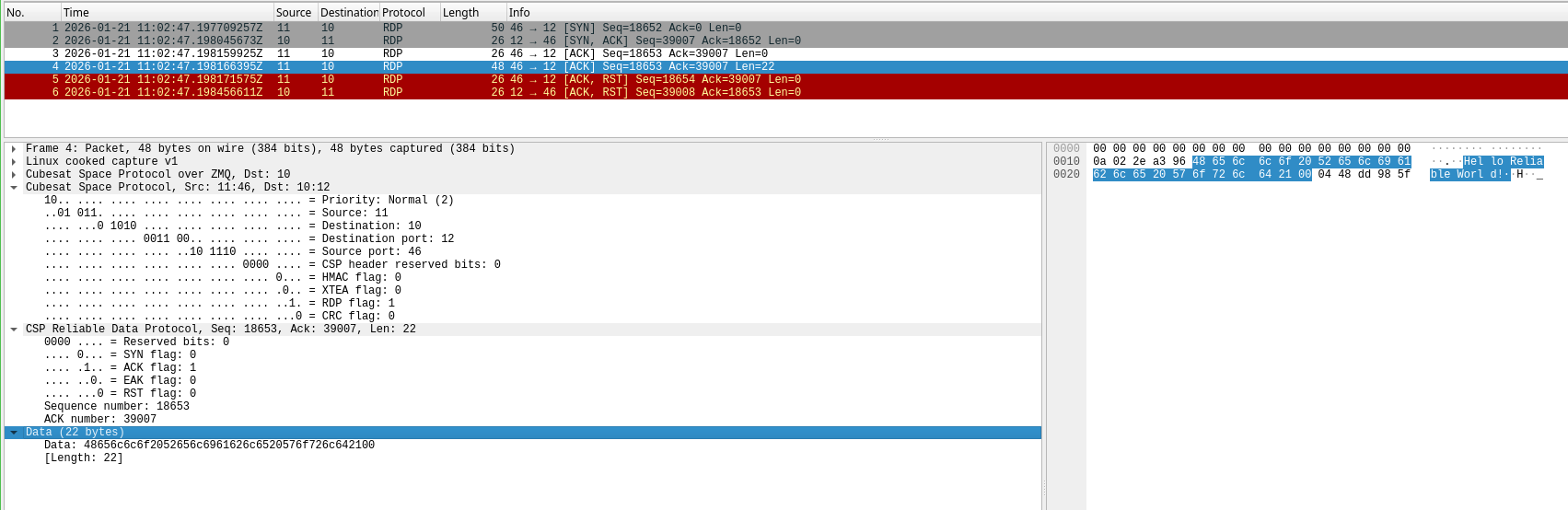
Finally, the initiator sends an ACK,RST packet, since it has no more data to send. The responder replies with an ACK,RST packet that confirms the reception of the data packet and closes the connection.
One comment